

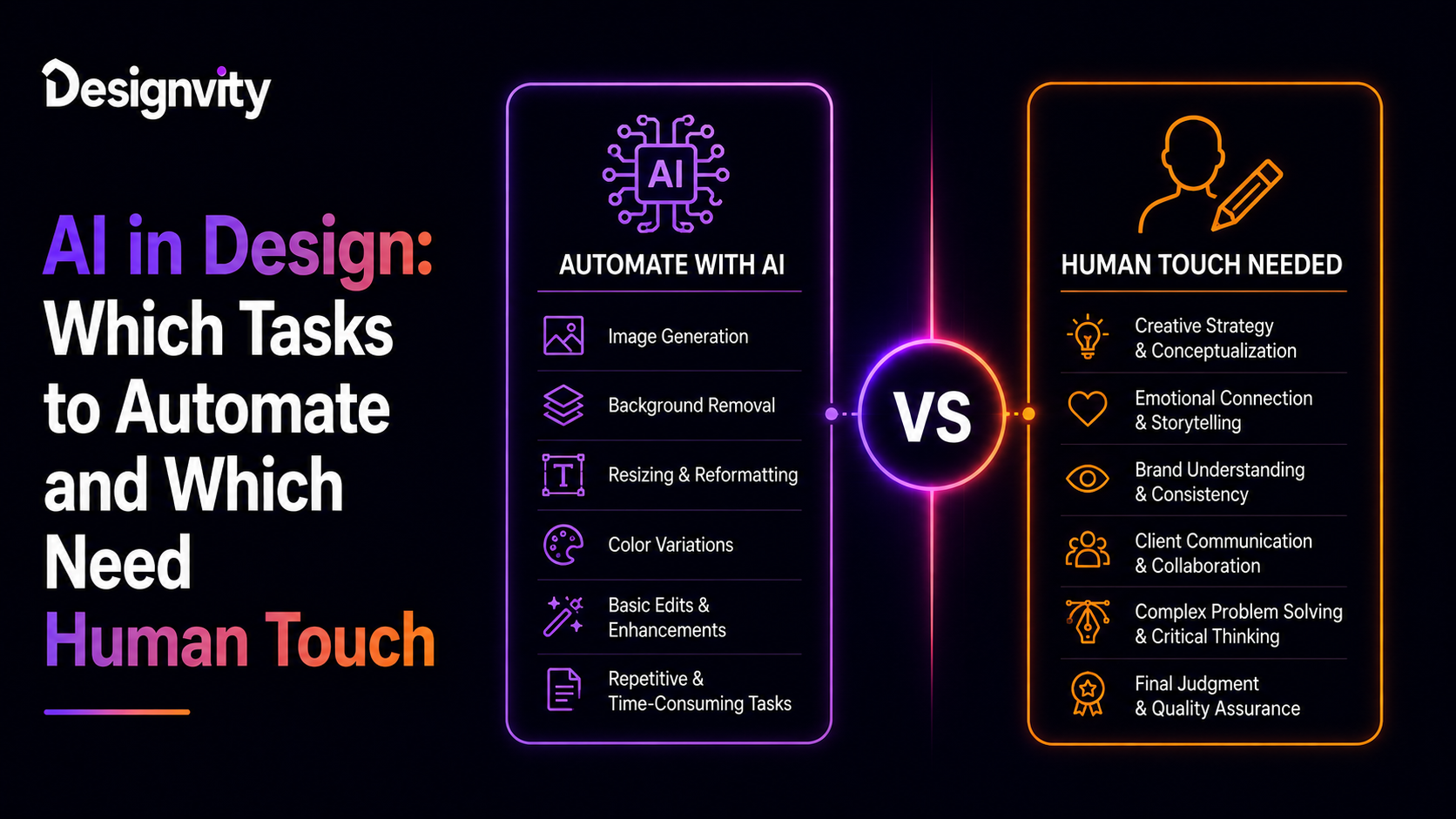
Artificial Intelligence has transformed nearly every creative industry, and design is no exception. Today’s AI tools can generate logos, edit images, remove backgrounds, create social media graphics, write marketing copy, and even produce complete website layouts within minutes.
For businesses, this raises an important question:
Can AI replace designers?
The short answer is no—but it can make designers dramatically more productive.
Rather than replacing creativity, AI is becoming a powerful assistant that automates repetitive work while allowing designers to focus on strategy, storytelling, branding, and user experience.
Understanding the AI design tools effectiveness helps businesses invest wisely and build workflows that combine automation with human expertise.
In this guide, we’ll explore where AI excels, where it falls short, and why the future belongs to a hybrid creative process.
The Rise of AI in Modern Design
Over the past few years, AI has evolved from a simple image-generation tool into a creative assistant capable of supporting nearly every stage of the design process.
Today, AI helps with:
- Image generation
- Background removal
- Content creation
- Color suggestions
- Layout generation
- UI mockups
- Video editing
- Presentation design
- Brand asset creation
Instead of replacing designers, AI is reducing production time for repetitive tasks.
What AI Does Best
AI performs exceptionally well when tasks involve speed, repetition, or pattern recognition.
1. Background Removal
Removing image backgrounds once required manual editing.
Today, AI can complete the same task in seconds with impressive accuracy.
2. Image Enhancement
AI can quickly:
- Improve resolution
- Reduce noise
- Adjust lighting
- Upscale images
- Sharpen details
These tasks save significant editing time.
3. Content Variations
Need multiple versions of a social media graphic?
AI can rapidly generate:
- Multiple layouts
- Alternative headlines
- Different color schemes
- Various ad creatives
This accelerates marketing campaigns.
4. Brainstorming Ideas
AI is an excellent creative partner during early ideation.
It can suggest:
- Design directions
- Mood boards
- Typography combinations
- Color palettes
- Campaign concepts
Designers then refine these ideas into polished, brand-ready assets.
5. Repetitive Production Work
AI excels at automating repetitive tasks such as:
- Image resizing
- Format conversion
- Asset organization
- Batch editing
- Template generation
Automation improves efficiency without reducing quality.
Where Human Designers Still Lead
While AI is becoming increasingly capable, it still lacks the strategic thinking and emotional understanding required for high-quality design.
Brand Strategy
Great brands aren’t created through prompts alone.
Human designers understand:
- Brand positioning
- Market differentiation
- Customer psychology
- Business goals
- Long-term identity
These strategic decisions require experience and context.
Creative Storytelling
Design communicates ideas and emotions.
Humans naturally understand:
- Narrative
- Tone
- Cultural context
- Audience expectations
- Emotional impact
AI can imitate styles but struggles to create meaningful stories that connect with people.
User Experience (UX)
Effective UX design requires empathy.
Designers research:
- User behavior
- Pain points
- Accessibility
- Navigation patterns
- Conversion goals
AI can generate interface concepts but cannot replace user research and product strategy.
Complex Problem Solving
Every design challenge is unique.
Experienced designers balance:
- Business objectives
- Technical constraints
- User needs
- Brand identity
- Marketing goals
AI cannot independently make these nuanced trade-offs.
Client Collaboration
Successful design depends on communication.
Human designers:
- Ask questions
- Clarify objectives
- Interpret feedback
- Present ideas
- Build trust
These collaborative skills remain difficult to automate.
Human vs AI Design Comparison
| Task | AI Performance | Human Performance |
| Background Removal | Excellent | Excellent |
| Image Upscaling | Excellent | Excellent |
| Social Media Variations | Excellent | Very Good |
| Layout Suggestions | Very Good | Excellent |
| Logo Concepts | Good | Excellent |
| Branding Strategy | Limited | Excellent |
| UX Research | Limited | Excellent |
| Design Systems | Moderate | Excellent |
| Creative Direction | Limited | Excellent |
| Client Communication | Very Limited | Excellent |
The comparison shows that AI excels at execution, while humans remain essential for strategy, creativity, and collaboration.
Building an AI-Assisted Design Workflow
The most successful creative teams don’t choose between AI and human designers—they combine both.
An effective AI-assisted design workflow typically looks like this:
Step 1: Creative Brief
Human team defines:
- Business goals
- Target audience
- Brand guidelines
- Project objectives
Step 2: AI-Assisted Ideation
AI generates:
- Initial concepts
- Mood boards
- Layout options
- Color palettes
- Content ideas
Step 3: Human Design
Designers refine the concepts by applying:
- Brand identity
- Visual hierarchy
- User experience
- Accessibility
- Creative direction
Step 4: AI Production Support
AI accelerates production through:
- Background removal
- Image enhancement
- Asset resizing
- Version creation
- File optimization
Step 5: Human Review
Before delivery, designers ensure:
- Brand consistency
- Design quality
- Accuracy
- Compliance
- User experience
The final approval remains a human responsibility.
Common Misconceptions About AI Design
Myth 1: AI Eliminates Designers
Reality:
AI changes how designers work rather than replacing them.
Myth 2: AI Creates Perfect Designs
AI generates ideas quickly, but outputs often require refinement, editing, and strategic alignment.
Myth 3: Faster Means Better
Speed alone doesn’t guarantee quality.
Effective design balances efficiency with creativity and business objectives.
Myth 4: AI Understands Brand Identity
AI follows prompts but doesn’t truly understand a company’s values, positioning, or long-term vision.
Benefits of Combining AI and Human Creativity
Organizations adopting a hybrid approach experience several advantages.
These include:
- Faster project completion
- Higher creative output
- Reduced production costs
- Better consistency
- More time for strategy
- Increased experimentation
- Improved team productivity
- Enhanced client satisfaction
AI becomes a productivity multiplier rather than a replacement.
When Businesses Should Use AI
AI is ideal for:
- Marketing asset production
- Image editing
- Content variations
- Presentation graphics
- Social media creatives
- Batch resizing
- Creative brainstorming
- Internal design support
These tasks benefit from automation without sacrificing quality.
When Human Designers Are Essential
Human expertise remains critical for:
- Brand identity development
- Website UX/UI
- Product design
- Conversion optimization
- Advertising campaigns
- Packaging design
- Creative strategy
- Customer experience
- High-value presentations
These projects require insight, empathy, and strategic thinking.
The Future of AI in Design
The next generation of AI will become even more integrated into daily design workflows.
Future capabilities may include:
- Smarter design recommendations
- Personalized design generation
- Automated accessibility improvements
- Predictive UX insights
- Faster prototyping
- AI-powered design systems
- Real-time collaboration with creative teams
However, the most successful businesses will continue to combine AI efficiency with human creativity.
How Designvity Uses AI Responsibly
At Designvity, we embrace AI as a productivity tool—not as a replacement for experienced designers.
Our workflow combines AI-powered automation with human creativity to deliver faster turnaround times while maintaining exceptional design quality.
Our services include:
- Unlimited Graphic Design
- Branding & Identity Design
- UI/UX Design
- Website Design
- Landing Page Design
- Motion Graphics
- Social Media Design
- Presentation Design
- Marketing Creative Support
- White Label Design Services
By integrating AI into repetitive production tasks while keeping creative strategy in the hands of experienced designers, we help businesses achieve better results without compromising originality or brand consistency.
People Also Search For
- AI design tools effectiveness
- AI-assisted design workflow
- human vs AI design comparison
- AI graphic design tools
- AI for creative agencies
- AI in branding
- AI website design
- AI design automation
- graphic design with AI
- AI creative workflow
People Also Ask
Can AI replace graphic designers?
AI can automate repetitive design tasks and assist with content generation, but it cannot replace human creativity, strategic thinking, brand development, or user experience design.
What design tasks are best suited for AI?
AI performs well in areas such as background removal, image enhancement, resizing, generating design variations, brainstorming concepts, and producing marketing assets.
What tasks still require human designers?
Brand strategy, UX research, creative storytelling, visual identity, customer experience design, and client collaboration continue to rely on human expertise.
What is an AI-assisted design workflow?
An AI-assisted design workflow combines AI tools for automation and ideation with human designers who guide strategy, refine concepts, and ensure quality.
How does Designvity use AI in design?
Designvity uses AI to streamline repetitive production tasks while relying on experienced designers for creative direction, branding, UI/UX, and strategic decision-making.
Frequently Asked Questions
Will AI reduce design costs?
AI can reduce production time and improve efficiency, but high-quality design still requires skilled professionals to guide strategy, ensure originality, and deliver business-focused results.
Can AI create complete brand identities?
AI can generate concepts and inspiration, but successful brand identities require human understanding of audience, positioning, messaging, and long-term business goals.
Should businesses rely only on AI design tools?
No. Businesses achieve the best outcomes by combining AI automation with professional designers who ensure creativity, consistency, and strategic alignment.
Is AI useful for creative agencies?
Yes. AI helps agencies accelerate production, generate concepts, and automate repetitive tasks, allowing creative teams to focus on higher-value work.
Why choose Designvity?
Designvity blends cutting-edge AI tools with experienced designers to deliver scalable, high-quality creative solutions. Our hybrid approach ensures businesses benefit from faster workflows without sacrificing originality, strategic thinking, or brand integrity.
Conclusion
AI is transforming the design industry, but its greatest value lies in enhancing human creativity rather than replacing it. While AI excels at automation, production, and rapid idea generation, human designers remain indispensable for strategy, storytelling, user experience, and meaningful brand building.
The future of design isn’t AI versus humans—it’s AI working alongside talented creative professionals. Businesses that adopt this balanced approach will enjoy faster workflows, greater efficiency, and stronger creative outcomes.
At Designvity, we combine intelligent automation with expert design talent to help brands scale creative production while maintaining the originality, quality, and strategic thinking that only humans can provide.